
The Astra theme demo showcases one of the most popular WordPress themes for speed, flexibility, and design freedom. With over 1.5 million active installations, Astra offers ready-to-import starter templates for every niche—from blogs to online stores.
If you’re building a website with WordPress, chances are you’ve heard about the Astra theme. It’s one of the most downloaded and highly rated themes on the official WordPress repository—and for good reason. Whether you’re a blogger, small business owner, freelancer, or agency, Astra offers a powerful foundation that’s both beginner-friendly and developer-approved.
What makes Astra stand out is its balance of simplicity and power. Unlike bulky themes packed with features you’ll never use, Astra keeps things lean. It’s lightweight, fast, and designed to work seamlessly with popular page builders like Elementor and Gutenberg. But the real magic happens when you explore the Astra theme demo library. These ready-made website templates let you launch a professional-looking site in minutes—no design skills required.
Key Takeaways
- Lightweight and fast: Astra is built for performance, loading in under 50KB and scoring high on speed tests.
- 180+ pre-built demos: Choose from a wide range of professionally designed templates for businesses, portfolios, and eCommerce sites.
- Seamless page builder integration: Works flawlessly with Elementor, Beaver Builder, Gutenberg, and more.
- Highly customizable: Adjust colors, fonts, layouts, and spacing without touching a line of code.
- SEO-optimized structure: Clean code and schema markup help improve your site’s search engine rankings.
- Free and premium versions: Start with the free version or upgrade to Astra Pro for advanced features like sticky headers and custom layouts.
- Regular updates and support: The theme is actively maintained with frequent updates and responsive customer support.
Quick Answers to Common Questions
What is the Astra theme demo?
The Astra theme demo refers to the collection of pre-built website templates that showcase the design and functionality of the Astra WordPress theme. These demos allow users to preview and import full websites for various niches.
Is the Astra theme free?
Yes, Astra has a free version available in the official WordPress theme directory. It includes core features and access to most starter templates. Astra Pro offers additional advanced features for a one-time fee.
Can I use Astra with Elementor?
Absolutely! Astra is fully compatible with Elementor and includes many demos specifically built for it. The combination allows for fast, flexible, and visually rich website design.
How do I import an Astra demo?
Install the Astra theme and the Starter Templates plugin. Then go to Appearance > Starter Templates, choose a demo, and click “Import.” The entire site will be set up in minutes.
Does Astra slow down my website?
No—Astra is one of the lightest themes available, weighing under 50KB. It’s optimized for speed and performs well on speed testing tools like GTmetrix and Google PageSpeed Insights.
📑 Table of Contents
Why Choose the Astra Theme?
When picking a WordPress theme, most people care about three things: speed, ease of use, and flexibility. Astra nails all three. It’s built with performance in mind, so your site loads quickly—even on shared hosting. Faster load times mean better user experience and improved SEO rankings, which is why many experts recommend Astra for high-performing websites.
Another big plus? Astra doesn’t force you into a rigid design. You can customize almost every part of your site using the WordPress Customizer. Change header layouts, tweak button styles, adjust spacing, and switch color schemes—all with live previews. And because it’s compatible with major page builders, you can design complex layouts without writing code.
Speed and Performance
Astra is one of the lightest themes available, weighing in at just 50KB. That means it won’t slow down your site with unnecessary scripts or bloat. In fact, it consistently ranks among the top themes for speed on tools like GTmetrix and PageSpeed Insights. This performance edge is especially valuable for SEO, as Google favors fast-loading sites.
Beginner-Friendly Yet Developer-Ready
Don’t let its simplicity fool you—Astra is also loved by developers. It follows WordPress coding standards, supports hooks and filters, and integrates well with custom plugins. At the same time, beginners can get started quickly thanks to intuitive controls and clear documentation.
Exploring the Astra Theme Demo Library
Visual guide about Astra Theme Demo
Image source: jennifer-franklin.com
One of the biggest advantages of using Astra is access to its extensive demo library. With over 180 professionally designed starter sites, you can find a template that matches your niche—whether you’re launching a restaurant website, an online course platform, or a photography portfolio.
Each Astra theme demo is fully customizable. You can import the entire site with one click, then replace the content, images, and branding to make it your own. This saves hours of design work and ensures your site looks polished from day one.
How to Import an Astra Demo
Importing a demo is simple. First, install the Astra theme and the Starter Templates plugin (free). Then, go to Appearance > Starter Templates in your WordPress dashboard. Browse the library by category—Business, Blog, WooCommerce, Education, etc.—and preview any demo you like. When you find one you love, click “Import” and watch your site transform in seconds.
Pro tip: Use the “Elementor” filter to find demos optimized for Elementor, or choose “Gutenberg” if you prefer the native WordPress editor.
Popular Demo Categories
Some of the most popular Astra theme demo categories include:
- Business & Corporate: Clean, professional layouts for agencies, consulting firms, and startups.
- Online Stores: WooCommerce-ready designs with product showcases, cart integration, and checkout optimization.
- Blogs & Magazines: Reader-friendly templates with featured posts, sidebar options, and social sharing.
- Portfolios & Creatives: Visual-focused designs for photographers, designers, and artists.
- Health & Wellness: Calm, trustworthy layouts for clinics, coaches, and fitness brands.
Each demo includes realistic content, placeholder images, and functional elements like contact forms and testimonials—so you can see exactly how your final site will look and behave.
Customization Options in Astra
Visual guide about Astra Theme Demo
Image source: wpkube.com
Astra gives you full control over your site’s appearance without requiring coding knowledge. The WordPress Customizer is your command center for design changes. You can adjust:
- Typography (fonts, sizes, line height)
- Colors (primary, secondary, background, text)
- Header and footer layouts
- Button styles and hover effects
- Spacing and margins
- Mobile responsiveness settings
Global Styles and Layouts
Astra introduces a “Global” settings panel where you can define default styles for buttons, links, headings, and more. Once set, these styles apply across your entire site—making updates quick and consistent.
You can also choose from multiple container layouts: full width, boxed, or padded. This flexibility lets you match your site’s design to your brand’s personality.
Header and Footer Builder
With Astra Pro (the premium version), you unlock the Header and Footer Builder. This drag-and-drop tool lets you create custom headers with logos, menus, search bars, and call-to-action buttons. You can even set different headers for different pages—perfect for landing pages or special promotions.
Astra and Page Builders: A Perfect Match
Astra plays nicely with all major page builders, but it shines brightest with Elementor. The two work together to deliver a smooth, visual editing experience. When you import an Elementor-based Astra theme demo, you get a fully designed page that you can tweak in real time.
For example, imagine importing a “Digital Marketing Agency” demo. You’ll see a hero section with a headline, subheading, and CTA button—all built with Elementor widgets. You can click on any element, change the text, swap the image, or adjust the animation—all without leaving the editor.
Compatibility with Other Tools
Astra also integrates with:
- Gutenberg: The default WordPress block editor works seamlessly with Astra’s layout options.
- Beaver Builder: Popular among developers for its clean output and flexibility.
- Brizy and Oxygen: Modern builders that benefit from Astra’s lightweight structure.
This compatibility means you’re not locked into one tool—you can switch or combine builders as your needs evolve.
Astra Free vs. Astra Pro: Which Should You Choose?
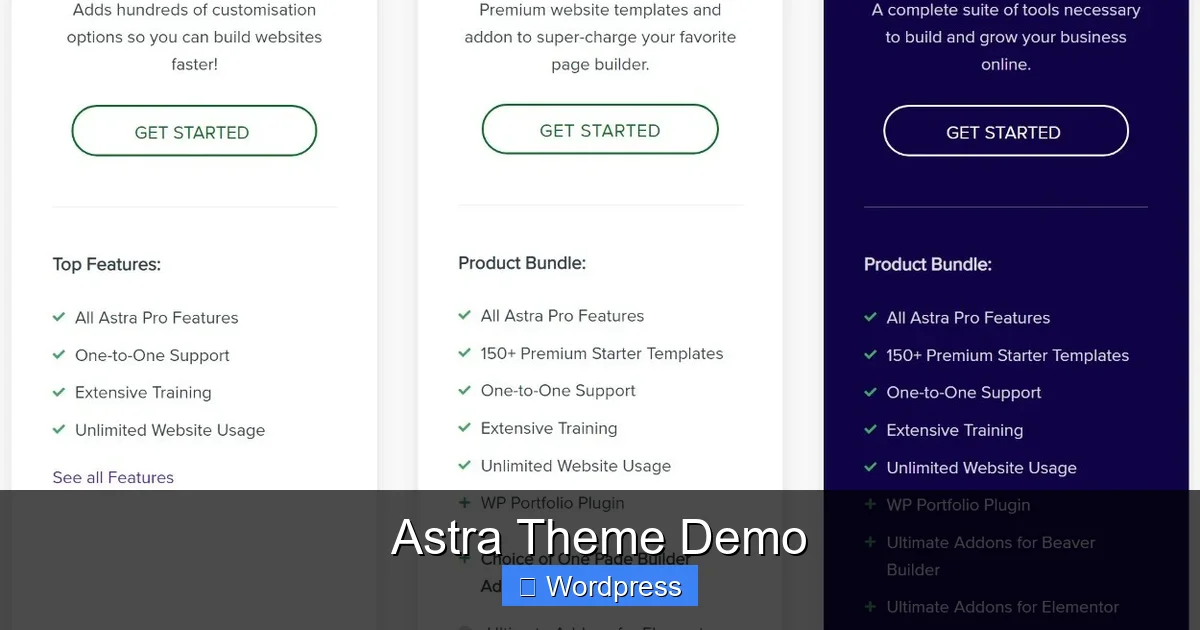
The free version of Astra is incredibly capable. It includes the core theme, access to most starter templates, and essential customization options. For many users—especially bloggers and small businesses—the free version is more than enough.
But if you want advanced features, Astra Pro is worth the investment. The premium version adds:
- Custom header and footer builder
- Sticky headers and transparent headers
- WooCommerce enhancements (product filters, quick view)
- Advanced typography and spacing controls
- Conditional display rules (show/hide elements based on user role, page, etc.)
- White-label options for agencies
Is Astra Pro Worth It?
If you’re building multiple client sites or need granular control over design and functionality, Astra Pro pays for itself quickly. The one-time payment (with annual renewals for updates) includes lifetime use on unlimited sites—a great deal compared to monthly subscriptions.
SEO and Accessibility: Built-In Advantages
Astra isn’t just pretty—it’s smart. The theme is built with SEO best practices in mind. It generates clean, semantic HTML, supports schema markup, and integrates with popular SEO plugins like Yoast and Rank Math.
It’s also accessibility-ready, meaning it follows WCAG guidelines for users with disabilities. Features like proper heading structure, keyboard navigation, and ARIA labels make your site usable for everyone.
Performance for SEO
Since page speed is a ranking factor, Astra’s lightweight design gives you an edge. Faster sites rank higher, convert better, and keep visitors engaged. Plus, Astra works well with caching plugins and CDNs, so you can push performance even further.
Getting Started with Astra
Ready to try Astra? Here’s how to get started:
- Install the Astra theme from the WordPress repository.
- Install the “Starter Templates” plugin (free).
- Browse the demo library and import a template that fits your niche.
- Customize the design using the WordPress Customizer or your preferred page builder.
- Replace placeholder content with your own.
- Launch your site!
If you run into issues, Astra’s documentation is thorough, and their support team is responsive—especially for Pro users.
Final Thoughts
The Astra theme demo library is more than just a collection of pretty designs—it’s a launchpad for your next WordPress project. Whether you’re building a personal blog, a corporate site, or an online store, Astra offers the speed, flexibility, and ease of use you need to succeed.
Its lightweight code ensures fast loading times, while its deep customization options let you create a unique look without coding. And with seamless integration into page builders and SEO tools, Astra fits perfectly into any modern WordPress workflow.
If you haven’t tried Astra yet, now’s the time. Explore the demos, test a few templates, and see how quickly you can go from idea to live website.
Frequently Asked Questions
Can I use Astra for an eCommerce site?
Yes, Astra is fully compatible with WooCommerce. It includes specialized demos for online stores and offers Pro features like product filters and quick view to enhance the shopping experience.
Do I need coding skills to use Astra?
No. Astra is designed for users of all skill levels. You can customize your site using the WordPress Customizer or drag-and-drop page builders like Elementor—no coding required.
How often is Astra updated?
Astra is actively maintained with regular updates for compatibility, security, and new features. Both free and Pro users receive updates, though Pro users get priority support.
Can I use Astra on multiple websites?
Yes. The free version can be used on unlimited sites. Astra Pro also allows use on unlimited websites with a single license, making it ideal for freelancers and agencies.
What happens if I deactivate Astra?
If you deactivate Astra, your site will revert to the default WordPress theme (like Twenty Twenty-Four). Your content remains intact, but custom styles and layouts may be lost unless you reactivate Astra or switch to a compatible theme.
Is Astra good for SEO?
Yes. Astra generates clean, semantic code, supports schema markup, and loads quickly—all factors that contribute to better SEO performance. It also works well with SEO plugins like Yoast.