
This guide walks you through how to create a landing page in WordPress using built-in tools, popular page builders, and plugins. Whether you’re promoting a product, collecting leads, or launching a campaign, you’ll learn to build a fast, responsive, and conversion-focused page—no coding required.
Key Takeaways
- Choose the right tool: Use a dedicated landing page plugin or a page builder like Elementor for maximum flexibility and design control.
- Start with a template: Save time by using pre-designed landing page templates tailored to your goal (e.g., lead capture, sales, webinar signup).
- Optimize for conversions: Include a clear headline, compelling call-to-action (CTA), and minimal distractions to guide visitors toward your goal.
- Ensure mobile responsiveness: Test your landing page on all devices—most traffic comes from mobile users.
- Integrate with email tools: Connect your form to email marketing services like Mailchimp or ConvertKit to capture and nurture leads.
- Use a focused design: Avoid navigation menus and external links that could distract visitors from taking action.
- Test and improve: Use A/B testing to refine headlines, CTAs, and layouts for better performance over time.
How to Create a Landing Page in WordPress
Creating a high-converting landing page in WordPress is easier than you think—even if you’re not a developer. Whether you’re promoting a product, running a lead magnet campaign, or launching an event, a well-designed landing page can dramatically boost your results.
In this guide, you’ll learn how to create a landing page in WordPress using practical, beginner-friendly methods. We’ll cover using themes, plugins, and page builders like Elementor. By the end, you’ll have a professional, mobile-friendly landing page ready to convert visitors into customers or subscribers.
Step 1: Choose Your Landing Page Method
Visual guide about How to Create a Landing Page in WordPress
Image source: i0.wp.com
WordPress offers several ways to build a landing page. Your choice depends on your technical comfort, design needs, and goals.
Option 1: Use a Landing Page Plugin
Plugins like Thrive Architect, Leadpages, or OptinMonster are built specifically for creating high-converting landing pages. They offer drag-and-drop editors, conversion-focused templates, and built-in A/B testing.
These tools are ideal if you want speed and simplicity. For example, Thrive Architect integrates directly with WordPress and lets you design pages without touching code.
Option 2: Use a Page Builder
Popular page builders like Elementor, Divi, or WPBakery allow you to create custom landing pages using visual editors. Elementor is especially user-friendly and offers free and pro versions.
If you’re already using a theme that supports Elementor (like Hello Elementor), this is a great option. You can also check out our guide on how to create a WordPress theme with Elementor for deeper customization.
Option 3: Use a Dedicated Landing Page Theme
Some WordPress themes are designed specifically for landing pages. These themes often include one-click demo imports and pre-built layouts.
For example, the Landing Page WordPress Theme offers minimal designs perfect for product launches or service promotions. You can learn more about choosing the right theme in our article on landing page WordPress themes.
Step 2: Install and Activate Your Chosen Tool
Once you’ve decided on your method, it’s time to install the plugin or theme.
Installing a Plugin
1. Go to Plugins > Add New in your WordPress dashboard.
2. Search for your chosen plugin (e.g., “Elementor” or “Thrive Architect”).
3. Click Install Now, then Activate.
After activation, the plugin will appear in your dashboard menu.
Installing a Theme
1. Go to Appearance > Themes > Add New.
2. Search for a landing page theme (e.g., “Astra” or “Neve”—both work well with page builders).
3. Click Install, then Activate.
If you’re using a premium theme, upload the ZIP file via Upload Theme.
> 💡 Pro Tip: Always use a child theme when making customizations. This protects your changes during theme updates.
Step 3: Create a New Page
Visual guide about How to Create a Landing Page in WordPress
Image source: maketecheasier.com
Now, let’s create the actual landing page.
1. Go to Pages > Add New.
2. Give your page a title (e.g., “Free Ebook Download” or “Join Our Webinar”).
3. Click Publish to create the page.
Don’t worry about content yet—we’ll design it next.
Step 4: Design Your Landing Page
This is where your landing page comes to life. We’ll use Elementor as an example, but the steps are similar with other builders.
Launch the Page Builder
1. In the page editor, click Edit with Elementor.
2. You’ll see a blank canvas with drag-and-drop widgets.
Choose a Template (Recommended)
Instead of starting from scratch, use a template:
1. Click the Folder icon (Templates).
2. Browse the library for landing page templates (e.g., “Lead Capture,” “Product Launch”).
3. Insert a template that matches your goal.
Templates save hours and are professionally designed for conversions.
Customize the Content
Now, personalize the template:
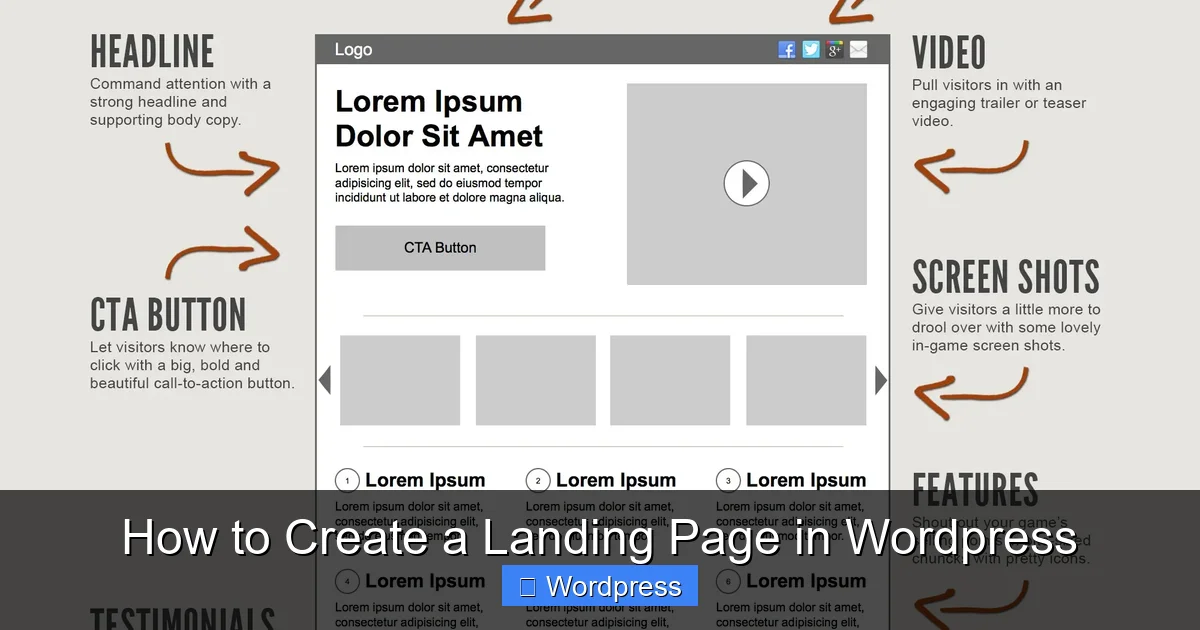
– Headline: Make it benefit-driven. Example: “Get Your Free Marketing Checklist Today!”
– Subheadline: Add a short explanation. Example: “Download our proven 10-step guide to grow your business.”
– Call-to-Action (CTA): Use action words like “Download Now,” “Get Access,” or “Start Free Trial.”
– Form: Add an email capture form. Most builders include form widgets.
– Image or Video: Use high-quality visuals to support your message.
> 🎯 Design Tip: Keep the layout clean. Remove unnecessary elements like sidebars, footers, and navigation menus. A focused page converts better.
Optimize for Mobile
1. Click the Responsive Mode icon (phone/tablet) in Elementor.
2. Adjust font sizes, button widths, and spacing for mobile.
3. Test how the form and CTA look on small screens.
Most traffic comes from mobile devices, so this step is critical.
Step 5: Connect Your Form to an Email Service
To capture leads, connect your form to an email marketing tool.
Popular Integrations
– Mailchimp: Free for up to 2,000 contacts.
– ConvertKit: Great for creators and bloggers.
– Brevo (formerly Sendinblue): Free plan with automation.
How to Connect
1. In your form widget, look for Actions After Submit.
2. Choose Email and enter your email address, or select Webhook or Integrations.
3. Follow the prompts to connect your email service (usually via API key).
Test the form by submitting it with a real email. You should receive a confirmation.
Step 6: Set Up Page-Specific Settings
To make your landing page truly effective, adjust a few settings.
Remove Navigation and Footer
Landing pages should have no distractions. In Elementor:
1. Go to Page Settings (bottom left).
2. Under Advanced > Custom CSS, add:
header, footer { display: none !important; }
3. Or use a plugin like Landing Page Builder that hides headers automatically.
Set a Custom URL (Optional)
By default, your page URL might look like:
yoursite.com/?page_id=123
To make it cleaner:
1. Go to Settings > Permalinks.
2. Choose Post name.
3. Edit the page slug to something like /free-ebook.
Now your URL is: yoursite.com/free-ebook
Step 7: Test and Publish
Before going live, test everything.
Checklist
– Does the page load quickly? (Use GTmetrix to test speed)
– Is the form working?
– Does the CTA button stand out?
– Is the page mobile-friendly?
– Are there any broken links or images?
Publish and Share
Once you’re satisfied, your page is ready! Share the link in ads, emails, or social media.
Troubleshooting Common Issues
Landing Page Not Displaying Correctly
– Clear your cache (browser and plugin).
– Check for plugin conflicts by deactivating other plugins temporarily.
– Ensure your theme supports full-width pages.
Form Not Sending Emails
– Verify your email service integration.
– Check spam folders.
– Use a plugin like WP Mail SMTP to improve email delivery.
Slow Loading Speed
– Optimize images (use TinyPNG).
– Use a caching plugin like WP Super Cache.
– Avoid too many animations or widgets.
Conclusion
Creating a landing page in WordPress doesn’t require coding or design expertise. With the right tools—like Elementor, a dedicated plugin, or a landing page theme—you can build a high-converting page in under an hour.
Remember: the best landing pages are focused, fast, and built with one clear goal. Whether you’re collecting emails, selling a product, or promoting an event, follow the steps above to create a page that delivers results.
Start simple, test often, and refine based on real visitor behavior. Your first landing page might not be perfect—but it’s a powerful step toward growing your audience and business.